Watchdogs
A watchdog is a function, that can be used to periodically monitor the state of another device, which is connected over network to this device. The other device is called target in this document.
If a target fails to be reachable, the watchdog is considered triggered, which can cause a notification get sent.
To configure the watchdogs feature of the device, please navigate to Watchdogs from the main menu in the Peripherals section.
The Watchdogs main page presents an overview table, where each row represents one Watchdog.

To navigate to the configuration page for a specific watchdog, click on the corresponding row.
The device provides two watchdogs.
Configuring a watchdog
In the watchdogs overview table, click on the row of the watchdog you would like to configure.
This will open the detail configuration page, as shown below.
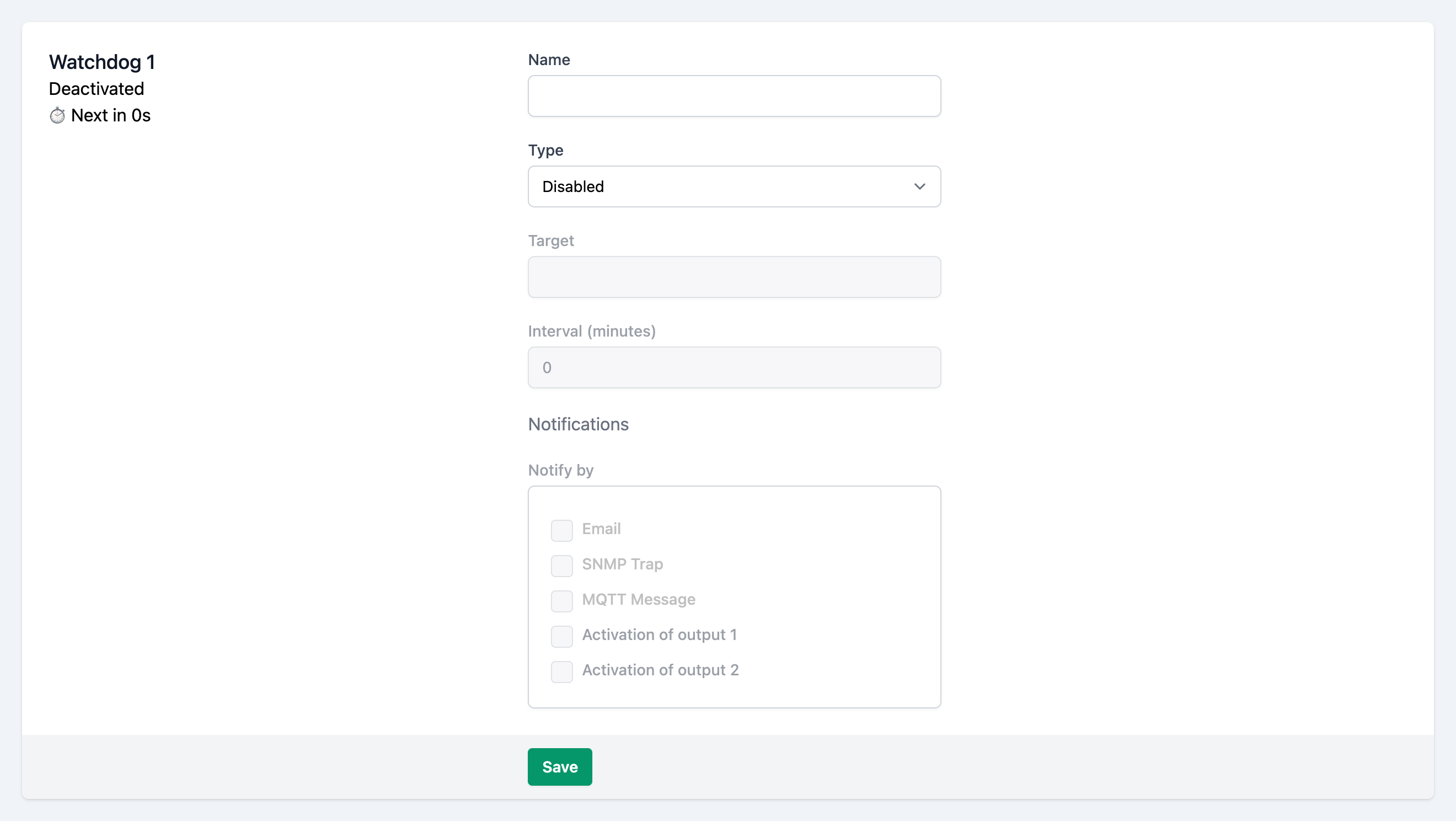
Name
Choose a descriptive name for the watchdog.
Group
Optionally enter a string as the name for the group, this peripheral should belong to.
If you use the same group name for other peripherals (sensors, digital I/Os, watchdogs), those can be shown and filtered by their group on the dashboard.
Type & Target
There are four types of watchdogs to choose from.
Depending on the type, the target field has different meanings.
Available Types:
- Ping out
Monitors the reachability of an external system (Target) by regular outgoing pings.
Target:RequiredTextThe IP address of the target device- Ping in
Monitors the presence of regular incoming pings from an external system to this device.
Target:RequiredTextThe IP address of the target device- HTTP out
Monitors the reachability of a (Target) URL by regular outgoing HTTP requests.
Target:RequiredTextAn URL of the HTTP endpoint to send the requests to- HTTP in
Monitors the presence of regular incoming HTTP requests from an external system to this device.
Target:RequiredTextA free to choose name, that has to be provided by the target device in the request URL.infoThe target system has to periodically (see Interval) send a HTTP request to this device with an URL of the form:
http://[IP of this device]/watchdog.cgi?name=[target field content]noteFor convenience, the request URL is shown on the left handside of the form on the configuration page.
Interval
For the types
- Ping in and HTTP in
- The maximum timespan between two incoming requests from the target device, to be considered reachable
- Ping out and HTTP out
- The interval between the regular outgoing requests going out from this device
Notifications
When a watchdog is triggered (the target system is unreachable), or reenters expected state, the device can emit notifications to make the user aware.
Check one or multiple of the checkboxes, which stand for the channel(s), over which the notifications get sent. Multiple channels can be activated simultaneously.
The device sends an email.
The exact text of the emails can be customized by supplying or editing a template on the email configuration page.
Email Configuration page- SNMP Trap
The device sends a SNMP trap.
SNMP Configuration page- MQTT Message
The device sends a MQTT message.
MQTT Configuration page- Activation of output 1
- The device activates digital output 1.
- Activation of output 2
- The device activates digital output 2.
Please note, that for
- Email (Configuration page)
- SNMP Trap (Configuration page)
- MQTT Message (Configuration page)
the respective interfaces have to be configured and enabled through their configuration pages.
Also refer to the Notifications docs page.
Box2Box actions
Similar to notifications, when the Box2Box Feature is enabled, the device can control an digital output on another device, when an events occurs with the peripheral.
The corresponding checkboxes are only visible, after the Box2Box feature has been enabled.
// TODO SCREEN
Check one or multiple of the checkboxes, which stand for the output(s), of the controlled device. Multiple outputs can be controlled simultaneously.
Save the configuration
After filling in the form, click on at the bottom of the page, to persist the configuration.